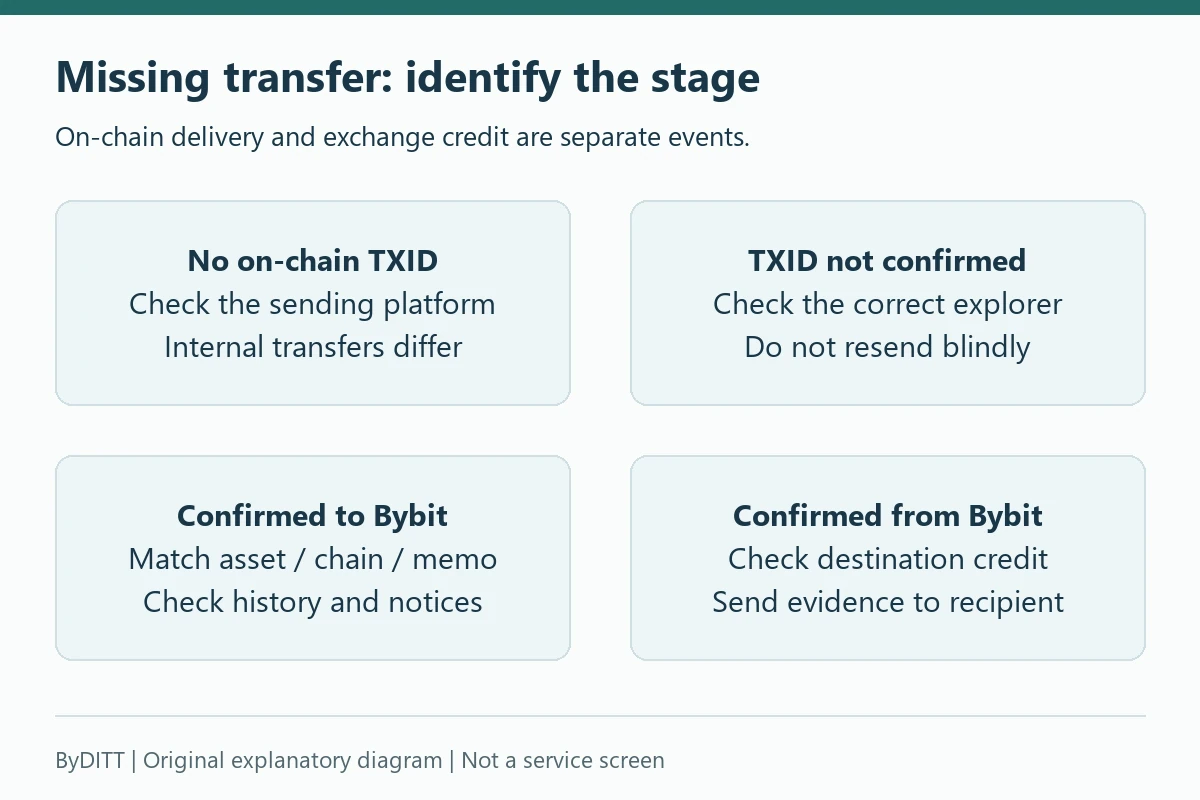
If a Bybit deposit or withdrawal is missing, first identify where the transfer stopped. A blockchain transfer can be unbroadcast, unconfirmed, sent to the wrong address or network, missing a memo, credited to a different Bybit account, held for verification, or completed on Bybit but not yet credited by the destination. Each problem requires different evidence and a different recovery route.
Reviewed: 18 October 2026. This troubleshooting guide concerns a transfer that is already missing, delayed, locked or rejected. It does not recommend making another deposit or promise that funds can be recovered.
ByDITT tool · no live transaction lookup
Transfer status guide
Choose what your record shows to find the next check.
This does not establish a cause or recover funds.
The choices load here. If they do not appear, use the detailed checks below.
Your selected path
Evidence checklist for official support
Asset, chain, original timestamp / time zone, status, order reference, and TXID or internal-transfer reference. Do not enter values here; use only the official secure case.
Do not repeat the transfer yet
When a transfer is delayed, sending the same amount again can double the exposure or repeat the original mistake. Stop, preserve the transaction details and classify the transfer.
- On-chain crypto deposit to Bybit
- On-chain crypto withdrawal from Bybit
- Internal transfer to another Bybit user
- Transfer between your own Funding, UTA or subaccounts
- Fiat deposit or withdrawal through a bank or provider
For the normal step-by-step process, read our Bybit deposit, withdrawal and transfer guide. This page focuses on failures and missing funds.
Evidence to collect before contacting support
- Bybit UID and the relevant account type
- Asset, amount and selected network
- Full sending and receiving addresses
- Memo, tag or destination identifier where applicable
- Transaction ID or hash and blockchain-explorer link
- Bybit deposit or withdrawal status and timestamp
- Sending or receiving platform’s order/reference ID
- Error message, email notice or Travel Rule request
Do not post this evidence publicly. Addresses and transaction hashes are not passwords, but they expose financial activity and can attract scammers. Never include a password, 2FA code, API secret, fund password or wallet recovery phrase.
Deposit missing: start with the blockchain transaction
For an on-chain deposit, open the sending platform’s withdrawal history and find the transaction hash. Without one, the sender may not have broadcast the transfer. By contrast, Deposit and withdrawal history explains that Bybit internal transfers have no blockchain TXID; investigate their internal order and recipient details instead. Do not treat a normal internal-transfer record as proof of an unbroadcast on-chain transaction.
- Open the transaction in the correct blockchain explorer.
- Confirm its status is successful rather than pending, failed or replaced.
- Compare the destination address with the address shown in Bybit deposit history.
- Confirm the asset and network were supported by Bybit at the time.
- Check the required confirmation count on the Bybit deposit page.
- Check whether a memo or tag was required and entered correctly.
- Review Bybit Funding Account → History and any Pending Assets area.
Why a confirmed deposit may not be credited
Bybit’s current on-chain deposit FAQ describes several possible reasons:
- The transaction has not reached Bybit’s required confirmation count.
- The memo or tag is missing or incorrect.
- The deposit used an unsupported coin, chain or transfer method.
- A smart-contract transfer method is not supported for that asset.
- A Travel Rule or address-verification step is pending.
- The amount is below the current minimum deposit.
- The deposit was credited to UTA or another configured destination account.
- The asset is shown as pending because of a chain-specific credit limit or review.
A successful blockchain transaction proves that the network moved assets to the address. It does not prove that Bybit can automatically associate and credit the deposit under the selected asset, chain, memo and account rules.
Credited, pending and withdrawable are different
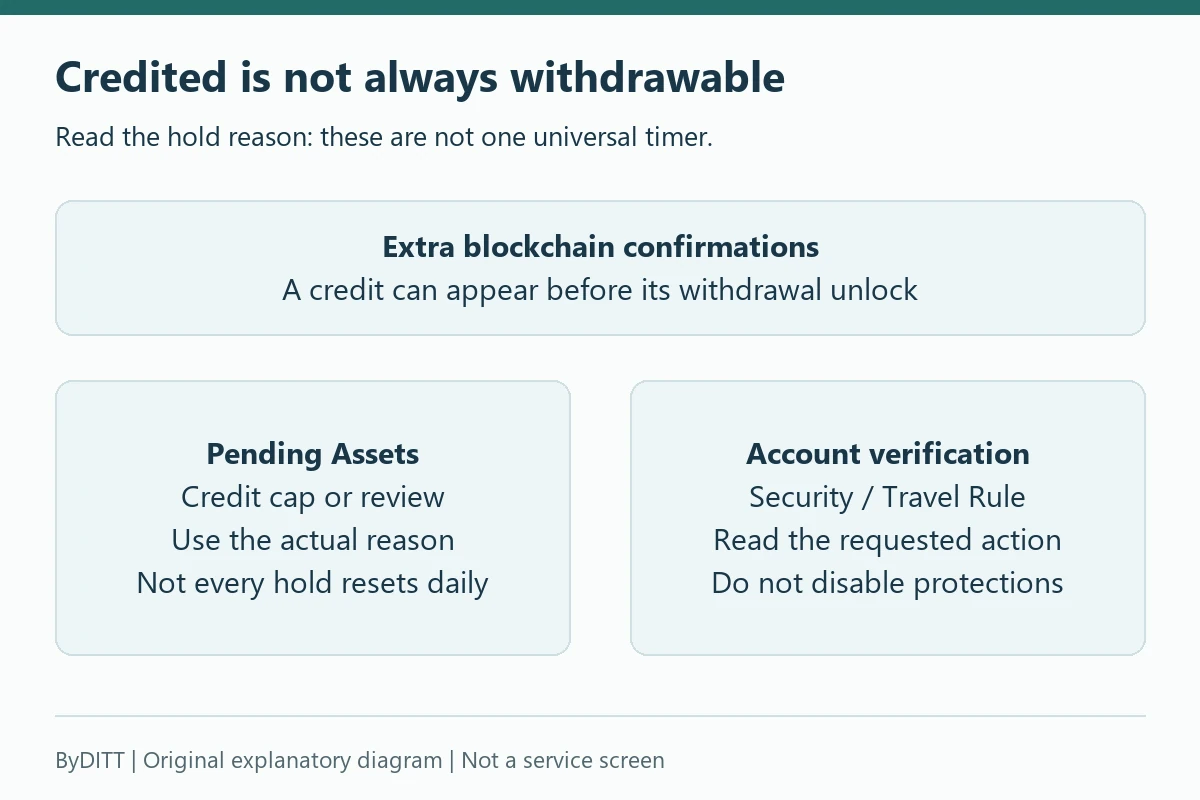
A deposit can be credited but remain locked for withdrawal until further blockchain confirmations, as explained in Unsuccessful withdrawal submissions. Check the recorded unlock requirement, not just an explorer’s “success” label. Separately, On-chain deposit FAQ describes chain-specific daily credit caps and other Pending Assets reviews. A daily-cap release is not a promise that an unsupported-asset, origin review or security hold will disappear at the same time.
A deposit below the asset’s stated minimum is not credited or refunded under the deposit FAQ. Do not assume several later transfers will combine to rescue it. Check the exact token contract, chain, deposit remarks and minimum before any future transfer.
Missing or wrong memo/tag
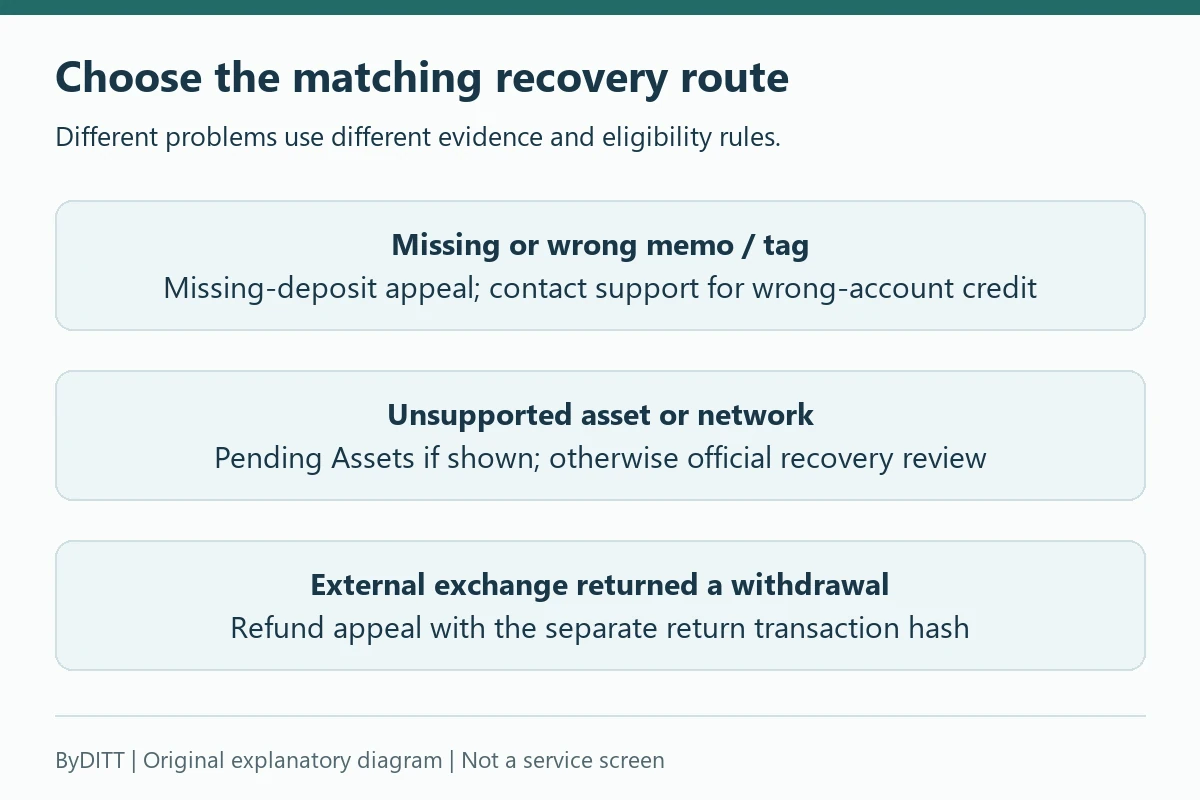
Some shared deposit addresses require an account-specific memo or tag. Without it, the blockchain can complete while Bybit cannot assign the deposit automatically. Use the official Help Center’s missing-deposit or self-service appeal route.
- Provide the exact asset, chain and transaction hash.
- Do not submit a web URL in a field that requests only the TXID.
- Read the current eligibility, fee and age limits shown by the appeal form.
- Understand that recovery is best-effort and may not be possible.
- Do not send an extra “verification deposit” unless the official secure process currently requires it and you have independently verified the page.
Bybit publishes a missing memo/tag self-service guide. Recovery rules and fees can change, so do not copy old numeric examples from a third-party article.
The Missing-deposit self-service recovery describes a refund to the source address if recovery succeeds, rather than automatic credit to your Bybit balance. It describes a handling charge of 5 times the normal withdrawal fee, deducted from the refund, with a minimum-refund eligibility check. Read the actual estimate before accepting a case; this is not a fixed USDT charge for every recovery route.
Conflicting age limits: the self-service guide updated 2026-10-16 states 180 days, while the Recovery-request errors page updated 2026-06-27 still states 90 days. These public descriptions differ. Do not wait for either deadline or assume the more permissive limit applies to your case: ask the current secure form or official support to confirm eligibility promptly. A history filter’s date range is a separate matter, not proof of recovery eligibility.
If a message says an abnormal-deposit issue is resolved but you received nothing, the recovery-error guide warns that a wrong memo may have credited another account. Escalate through official support immediately rather than marking your own case complete. That guide also describes additional verification, including a new deposit of at least 20% of the original amount in a specified manual-review situation after self-service rejection. This is not a general instruction to send more funds or pay an “unlock fee.” Independently open the official case and confirm the exact requirement, asset, network and memo before deciding anything; never follow a private-message wallet address. Submit identity evidence only through the verified secure case, not publicly.
Unsupported coin, network or transfer method
If the asset, network or transfer method was not supported, do not assume customer support can reverse the blockchain. Bybit describes unsupported-deposit recovery as limited, best-effort and fee-dependent. Some cases can be permanently unrecoverable.
- Do not send more of the unsupported asset to the same address.
- Preserve the TXID and the deposit-page configuration visible at the time.
- Use the official unsupported-deposit or Pending Assets route if available.
- Provide a compatible external return address only through the secure form.
- Ignore private messages claiming they can “unlock” the transaction.
The Unsupported-deposit recovery distinguishes an unsupported asset visible in Pending Assets, where a supported self-service return may be offered, from one not shown there, which needs official recovery review. The return address must be external and compatible with the same asset and chain. Coverage, minimum value, handling fees and processing differ by route; support may find a transaction unrecoverable. A quoted review period is not a promise of completed recovery.
Deposit shows completed but balance looks empty
- Check Funding Account, Unified Trading Account and any configured auto-transfer destination.
- Check open orders, Earn products and amounts pending release.
- Use the asset history filter for the exact coin and time.
- Confirm you are logged into the same main account and not a subaccount.
- Check whether the credited asset is a different token contract with a similar ticker.
Withdrawal pending or unsuccessful
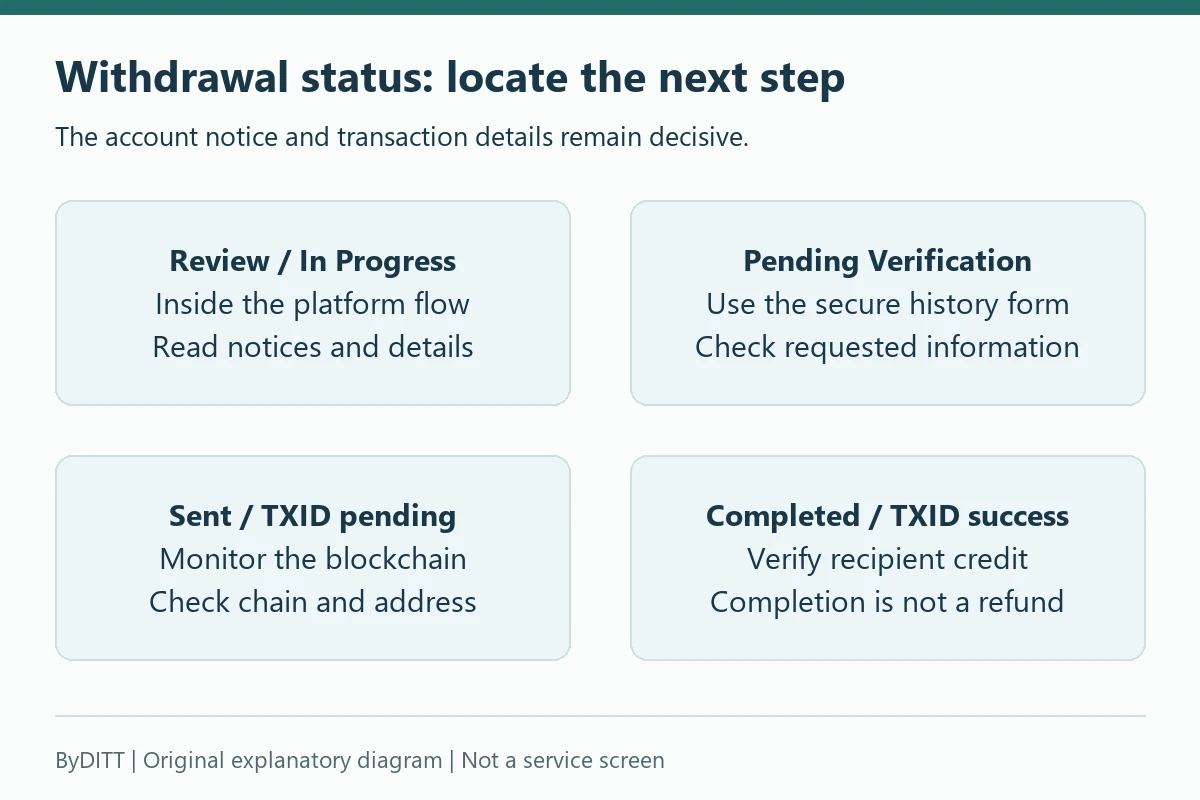
Open Bybit withdrawal history and check the status before using a blockchain explorer. If no transaction hash exists, the withdrawal may still be inside Bybit’s review, security or processing flow. Common causes can include insufficient available balance, account-security changes, withdrawal limits, risk review, network maintenance, incomplete verification, address restrictions or a mismatch in the submitted details.
- No TXID: review the in-account status, notices and required actions.
- TXID pending: monitor the blockchain and network conditions.
- TXID successful: confirm the destination address, network and destination credit rules.
- Rejected or canceled: verify where the balance returned and correct the stated cause before resubmitting.
Bybit’s topic list includes current guides for unsuccessful withdrawal submissions and additional verification. Use the error-specific official article linked from the status page.
The Unsuccessful withdrawal submissions lists 24-hour restrictions after specified security changes such as password or authenticator changes and passkey removal. This does not mean every withdrawal delay is a 24-hour hold. Read the account’s actual notice and release time; repeatedly changing security settings can create another restriction. See the account, KYC and security checklist for the separate account setup questions.
When history requests Travel Rule verification, use that secure history form and supply the accurate originator, beneficiary and wallet/platform information it asks for. Travel Rule FAQ describes the verification process. Requirements depend on the applicable service and account; language alone does not establish a residence or legal eligibility. Do not invent sender details or bypass a compliance request.
| History status | What to check next |
|---|---|
| Under Review / Withdrawal In Progress | Read platform review and submission notices; inspect the transaction details. |
| Pending Verification | Complete the requested wallet-ownership information in official history. |
| Sent | Use the correct chain and TXID to check confirmation. |
| Withdrawal Completed | Check the destination’s crediting status with the confirmed TXID. |
| Canceled / Rejected | Confirm the returned balance and stated reason before another request. |
Status labels follow the On-chain withdrawal FAQ. The appropriate action also depends on the actual transaction details; a missing hash in an internal transfer is normal.
Withdrawal completed on Bybit but missing at the destination
- Open the Bybit TXID in the correct blockchain explorer.
- Verify the transaction succeeded and reached the address you submitted.
- Check the destination’s confirmation requirement and maintenance status.
- Confirm the destination supports that asset contract and network.
- Check whether the destination required a memo or tag.
- Contact the destination platform with the TXID and deposit details.
If the blockchain shows delivery to the submitted address, the destination platform or wallet controls the next crediting step. Bybit cannot change a confirmed external transaction.
If the external exchange actually returns the withdrawal
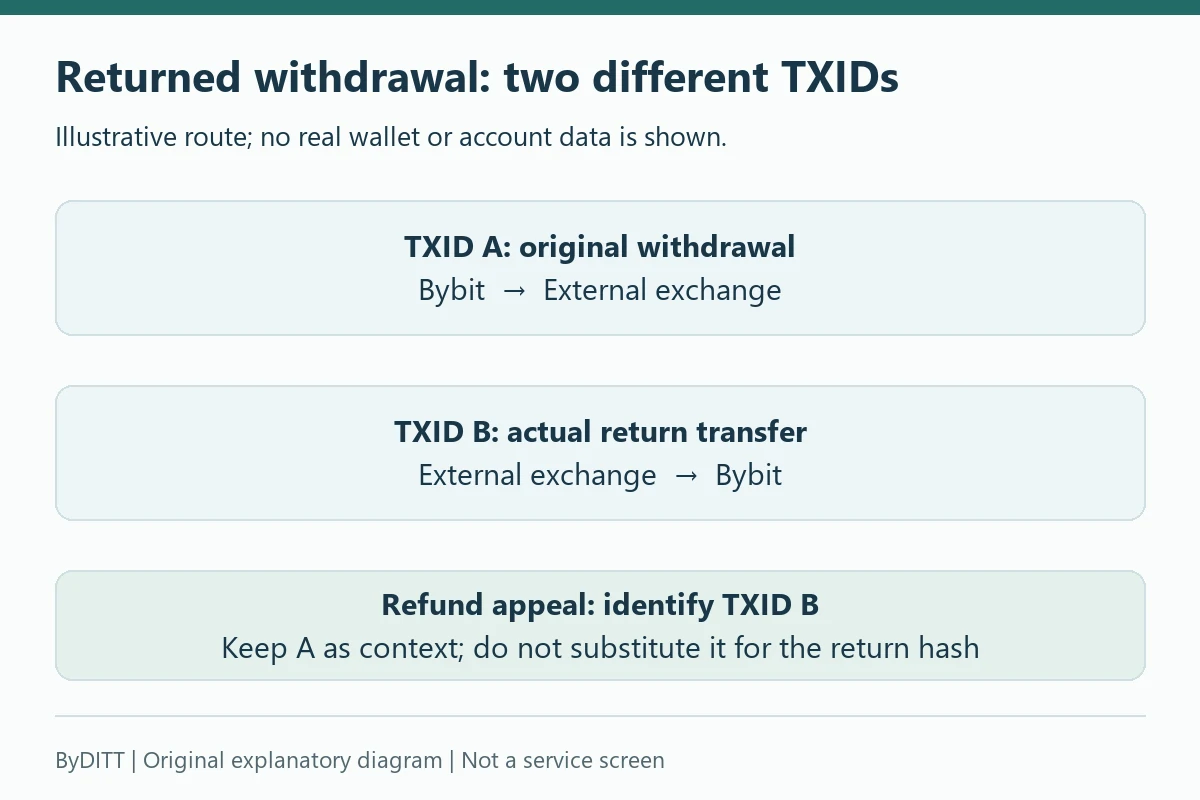
A destination saying “we will refund” is not evidence that it has already sent a return. Obtain the separate return TXID, asset, chain and net amount first. Then use the official Refund from an external exchange process: provide the return transaction hash, not only the original Bybit withdrawal hash. Retain the original withdrawal record as context. If no return hash exists, ask the destination about the return rather than filing an unrelated missing-memo appeal.
Keep the case number and requested evidence together. Bybit’s external-refund guide describes checking approved returned funds in Funding history under All Transactions / Transfer in. Review estimates are not guaranteed crediting times; follow the actual case for missing documents or further action.
Fees: never hard-code the “cheapest network”
Network support, withdrawal fees, minimums, congestion and exchange policies change. A statement such as “BEP-20 always costs $1” can become wrong and may encourage a network the destination does not support. Use the live withdrawal preview for the exact asset and network.
- Compare the displayed withdrawal fee and minimum.
- Check the amount the destination will receive after deductions.
- Confirm the cheaper network is actually supported by the destination.
- Include conversion spread if you swap assets to use another chain.
- Do not sacrifice address or network certainty for a small fee difference.
For current trading, funding, withdrawal and TradFi cost categories, see our Bybit fee guide.
The withdrawal FAQ permits available balances from Funding, UTA and Earn through the Withdrawal page, while some troubleshooting text focuses on Funding. Use the actual eligible account selector and available amount; a total-assets figure is not necessarily withdrawable. A UTA withdrawal can also increase account margin risk.
Fee mode can explain an available-balance error
Check whether the fee is deducted from the entered amount or the entered amount is the amount to be received. In the latter mode, the balance must cover the fee too. This distinction is described in the On-chain withdrawal FAQ.
| Hypothetical input | Result before other charges |
|---|---|
| Enter 100 USDT; assume fee 2 USDT; fee deducted from amount | Recipient receives 98 USDT; balance cost is 100 USDT. |
| Recipient must receive 100 USDT; assume fee 2 USDT added | Balance cost is 102 USDT. A 100 USDT available balance is insufficient. |
This is a ByDITT arithmetic illustration, not a current Bybit fee quote. Both rows assume the same invented 2 USDT fee and no other charge. Read your preview for asset, network, fee mode, minimum, balance cost and net receipt; do not “fix” a rejected request by choosing an incompatible chain.
Fiat deposit or withdrawal missing
- Confirm the bank or provider reference and processing status.
- Check that the payment account name matches KYC where required.
- Review provider cut-off times, weekends and requested documents.
- Check whether the fiat balance arrived in Funding Account.
- For a withdrawal, distinguish “processed by Bybit” from “credited by bank.”
- Contact the payment provider and Bybit through their official case routes with the same reference.
The Fiat deposit FAQ separates “Deposit Processing,” where documents may be requested, from a “Processing” order with an actual bank debit. If the bank already deducted the payment, investigate that order with its reference rather than blindly paying again. Use the current payment-detail estimate and official appeal route when overdue. Available fiat methods and timing vary by residence, currency and provider; this page does not establish a universal KRW bank-transfer route.
Use official history and support
Bybit’s history guide explains how to filter Funding Account history and interpret deposit statuses. Use that record as the basis for any support case.
- Open support from the official site or app.
- Include the exact problem category and complete transaction evidence.
- Keep the case number and reply in the same official thread.
- Verify email links and the anti-phishing code.
- Never pay a stranger for priority recovery.
Missing-funds decision checklist
- Was the transaction broadcast, and do I have a TXID?
- Is it confirmed on the correct blockchain?
- Do the asset, network, address and memo/tag match?
- Is the amount above the current minimum?
- Is it in Bybit history, Pending Assets, UTA or another account?
- Is verification, Travel Rule or network maintenance pending?
- Which platform controls the next step: sender, Bybit, blockchain or destination?
- Have I preserved evidence and used only official support?
Affiliate disclosure: ByDITT is an independent educational and affiliate site, separate from Bybit.com, and may receive compensation if you register through this optional link containing code BYBITDC. The code does not accelerate support, recover funds or override withdrawal restrictions. No fixed fee discount or recovery outcome is asserted. Conditions depend on the account, region, asset and applicable rules.
Educational information only. Networks, minimums, fees, recovery rules and processing requirements can change. Use the live Bybit asset page, transaction history and official Help Center for your case.
Official sources and verification date
Checked on 18 October 2026. Dates below are displayed document updates, not universal policy effective dates. The memo-recovery age-limit inconsistency is disclosed above; live account notices and official case requirements remain decisive.
- On-chain deposit FAQ — updated 2026-08-14.
- Missing-deposit self-service recovery — updated 2026-10-16.
- Recovery-request errors — updated 2026-06-27.
- Unsupported-deposit recovery — updated 2026-03-24.
- Unsuccessful withdrawal submissions — updated 2026-08-30.
- On-chain withdrawal FAQ — updated 2026-04-12.
- Deposit and withdrawal history — updated 2025-11-25.
- Refund from an external exchange — updated 2026-08-12.
- Travel Rule FAQ — updated 2026-08-23.
- Fiat deposit FAQ — updated 2026-10-07.
Educational information, not investment, tax or legal advice. Transfers can be irreversible and unsupported transfers can be lost permanently. Exchange custody, market, regulatory and account-access risks remain. Do not reveal passwords, one-time codes, API keys or seed phrases, or disable security to pursue a recovery.