For Bybit login on web or PC, use the official website for the service linked to your existing account. Choose your registered email/mobile or a linked sign-in method; use QR only if you are already logged in to the Bybit App.
Official sources checked: November 5, 2026. This is an independent access-check guide, not a Bybit login page or account-recovery service.
Choose the login problem you can observe
Pick the stage that fails. These links navigate this guide; they do not inspect your account or promise a fix. If you suspect someone else has access, go directly to the security and incident-response guide.
You can also review the normal web login checks, verification-loop checks or full problem comparison.
Bybit login on the web or a PC: choose the right entry
Use your established official bookmark or independently verify the website before selecting Log In. A search advertisement, familiar logo or padlock alone is not enough to establish who operates a page. If the destination is unexpected, stop before entering anything. The official Bybit login overview describes browser access; this guide does not supply an alternative login form.
Check the service entity as well as the brand. A regional service, a main account and a Subaccount are not interchangeable login destinations. Do not assume an account created under one service works on every Bybit-branded domain. Eligibility and product availability must be checked with the relevant service, not inferred from a successful page load.
- Confirm the account you intend to access. Distinguish your main account from a Subaccount before diagnosing a supposedly missing balance.
- Select a linked method. Use the registered email/mobile route or the Google/Apple option associated with that account. A familiar personal inbox is not necessarily the account’s recorded identifier.
- Complete the verification actually requested. Read the field label instead of trying every code you have. Signing in with Google and supplying a Google Authenticator code are different operations.
- Confirm the resulting account. Once access is restored, check the account identity and notices before assuming that all functions are available.
For an Apple-created account, the address may be an Apple relay rather than your normal inbox. Bybit’s Account Settings FAQ explains where to check this. For the wider registration-method comparison, see our account identifiers and sign-up methods guide. Do not create a replacement account merely because the first method you tried failed.
The requested verification code is missing
Read the field label and masked destination first. An email/SMS delivery problem is different from a code generated by Google Authenticator. Use the verification-code delivery checks for channel-specific troubleshooting; a public referral code cannot replace a private security code.
Is the error in MT5 rather than exchange web login?
MT5 messages such as Invalid Account or Server Not Found have a separate official MT5 troubleshooting guide. Check the MT5 account, password and server route there. Do not diagnose an exchange-account lock from an MT5 message alone.
Bybit QR login: an existing App session is required
Bybit’s official QR instructions specify a browser login QR, the scanner in an already logged-in Bybit App, and confirmation on the App. Menu placement can change, so follow the current interface.
- Display: choose the QR Code tab on the verified web login page. If no code appears, note that the failure is still at the page-loading stage.
- Scan: use the QR scanner in the already logged-in App to scan the code from the browser request you initiated. If the App is not authenticated, return to your linked sign-in or recovery route.
- Confirm: review the request and confirm in the App. If the browser still does not complete login, record whether scanning, App approval or the browser response failed, along with any exact notice.
As a safety check, initiate the browser request yourself and inspect what you are approving. Do not scan a login QR supplied by a stranger, a support impersonator or an unrelated message. If you are logged out of both devices, QR is not a substitute for recovering access. No usable login QR is displayed in this article.
Bybit login problems: choose the next check, not a random reset
The table below is ByDITT’s diagnostic framework, not a diagnosis of your account. Several causes can produce similar symptoms. The next action depends on what the official screen actually says.
On a narrow screen, scroll the comparison sideways to read all three columns. Keyboard users can focus the table region and use the arrow keys.
| What you observe | Check first | Next action and limit |
|---|---|---|
| App works; PC login does not | Is this the same service and account? Is the browser request yours? | Consider the official QR route if the App remains logged in. This does not remove account restrictions. |
| Identifier or password rejected | Registered method, selected main/Subaccount route and the exact error. | Use the linked route. Use Forgot Password only for an actual password problem, not as a first fix for every failure. |
| Email or mobile code absent | Masked destination and requested verification channel. | Use the verification-code delivery checks. A public referral code cannot authenticate you. |
| Passkey or old phone unavailable | Whether the credential is synced and whether another linked method exists. | Follow the lost-phone and passkey guide. Do not delete your only working credential as a test. |
| Page loops, stalls or shows blank controls | Whether failure occurs before or after submitting credentials. | Try a controlled browser check below. A loading problem alone does not prove a bad password or account suspension. |
| Unexpected login approval or suspected exposure | Whether you initiated it; any unfamiliar account activity. | Stop routine retries and use the security and incident-response guide. Never approve an unknown request to make a warning disappear. |
| Region, service or account restriction | The precise notice and relevant service’s official eligibility rules. | Use official support and the restricted-jurisdiction guide. Do not disguise location or supply false eligibility information. |
| Login works; withdrawal or another action fails | The action-specific notice, recent security changes and account requirements. | Treat it as a separate restriction. Successful authentication does not clear every security hold. |
Bybit login in Chrome: isolate a session issue cautiously
Bybit’s browser troubleshooting document discusses browser updates and a private-window comparison. These are tests for browser-related symptoms, not proof of a cause or a way around a restriction.
The page stalls or the login button does nothing
Does the page stop before you submit credentials, or only after pressing Log In? Missing controls, an unresponsive button and an explicit password rejection are different observations. Start by noting the failed stage and exact message. A blank page alone does not establish a password or account problem.
The App works, but Chrome or PC access fails
Confirm that both devices are using the same service and intended account. Keep a trusted App session available while checking the browser, rather than signing out of every device at once. Before attempting another login, make sure you can complete the required verification. A private window will not supply a missing security factor. The QR route above is an option only while the App remains authenticated.
If appropriate, compare one normal window with one private window or another supported, updated browser. Success in one context narrows the investigation; it does not identify a particular extension or cookie by itself. A fresh sign-in can also affect other active sessions. Do not keep opening additional sessions as though they were consequence-free.
The browser returns to login after verification
Record which verification or approval completed and which screen appeared next. Recheck the intended account and service before one controlled session comparison. A loop is not proof that the account needs a password reset, and a private window does not supply a missing factor. If the notice identifies an account or region restriction, follow the restriction guidance rather than changing location or retrying indefinitely.
Do not disable account protection, erase every site’s stored data or change your apparent country as a blanket remedy. If you consider clearing this site’s data, first account for saved sessions and recovery options. Repeating the same failed request without new evidence is less useful than preserving a clear error record.
Password recovery has consequences beyond signing in
Use Forgot Password from the verified service when a password reset is actually needed. If a required verification method is permanently unavailable, Bybit’s password-reset instructions point to the verification-problem route. A reset application is not an assurance of approval or immediate access.
Check the 24-hour restriction before changing the login password. The official document reviewed for this article lists crypto/fiat withdrawals, internal transfers, P2P trading/advertising and Bybit Card transactions as unavailable for 24 hours after the password is amended. Read the current account notice for the applicable timing and scope. This is not a claim that every login, failed attempt or recovery request starts the same hold.
A password change, a passkey removal and a security-factor reset are different events. Do not add their timelines together or assume that one document settles every recovery case. If the App is your only working access route, understand the required reset process before giving that access up.
Login success does not settle eligibility or account risk
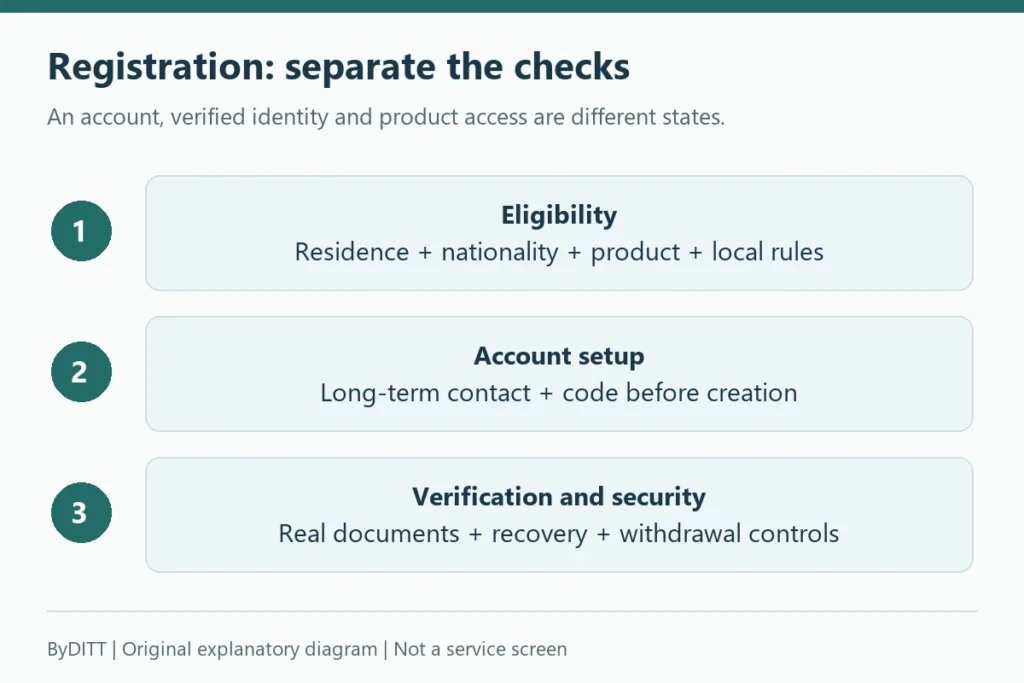
Authentication establishes access; it is not confirmation that your location, identity checks or intended product are eligible. For the separate registration and KYC checklist, see Bybit account, KYC and security checks. A registered account is also not evidence that custody or trading risk has disappeared.
Bybit’s Account Settings FAQ describes travel-related access restrictions and an official support route for urgent order or position issues. Losing access is not the same as cancelling an existing order or closing a position. If this applies, contact the relevant official service; do not assume a browser fix has resolved the exposure.
Prepare a useful support record without exposing secrets
Keep the minimum evidence needed to distinguish the failure. Use the provider’s verified support channel for account-specific information, not public comments or a stranger’s direct message.
- Record the date, time zone, device/browser version and whether the failure is on the web, App or both.
- State the stage: page opening, credential submission, verification, approval or an action after login.
- Copy the exact error and note the limited tests already tried. Redact personal identifiers in screenshots.
- Do not share passwords, live codes, QR codes, passkey secrets, recovery material or session data. Avoid uploading raw browser logs without understanding their sensitive contents.
ByDITT cannot inspect your account, remove a hold or guarantee a recovery outcome. The purpose of these checks is to select the correct official route while avoiding unnecessary security changes.
Official sources and scope
Sources were checked on November 5, 2026. A source’s publication or update date below is not a new policy effective date. The decision table and cautious testing sequence are ByDITT’s editorial framework; they are not Bybit’s determination of any individual case.
- Official Bybit web login — the direct entry checked for this guide; the service linked to your account and its regional conditions still matter.
- Bybit Learn: account login overview — published July 24, 2025; used for entry methods and account-route distinctions, not its promotional or regional examples.
- QR login instructions — displayed update August 17, 2026; the logged-in App prerequisite and confirmation step.
- Account Settings FAQ — displayed update November 25, 2025; Apple relay identity, session behaviour and travel-related access.
- Password-reset instructions — displayed update October 20, 2026; reset route, verification difficulties and the listed 24-hour restrictions.
- Browser troubleshooting — displayed update December 1, 2024; used only for limited browser comparisons, not location-routing advice.
- MT5 login errors — displayed update September 1, 2026; used only to separate MT5 account/server errors from exchange web login.
Independent-site disclosure: ByDITT is separate from Bybit and publishes educational content. The site may earn compensation from affiliate links elsewhere; this article contains no referral registration link. It is not account support, financial advice or legal advice. Account access, service eligibility and custody risk remain separate questions.